
1. Why four tools, not one
Every "language learning hack" you've seen on YouTube tries to compress the work into a single technique — shadowing, or anki, or comprehensible input. The FSI Basic Course is not that. It is four distinct skills practised in rotation, every weekday, for 25–88 weeks.
The four skills target four different layers of the same language:
| Tool | What it trains | Time per day |
|---|---|---|
| Shadowing | Ear + mouth muscle (prosody, connected speech) | 15–20 min |
| Mim-Mem | Memorised rhythmic templates (dialogue patterns) | 15–20 min |
| Pattern Drilling | Grammatical reflex (transformation under time pressure) | 20–30 min |
| Scriptorium | Consolidation through writing + lookup | 10–15 min |
Drop any one of them and the others stop compounding. That is why PrepLearnio ships four separate tools rather than one "do everything" mode. This guide walks you through each tool's actual interface, button by button, then shows how to combine them into a 30-day routine.
If you've never seen the underlying theory, read What FSI Mim-Mem Actually Is and Arguelles' original shadowing protocol before continuing. This article assumes you know why; here we focus on how.
2. Tool 1 · Shadowing — train the ear before the brain
URL: /method/shadowing/ · Goal: make English audio reach you as rhythm and intonation, not as a stream of words you translate.
2.1 What the buttons do
Top toolbar, left to right:
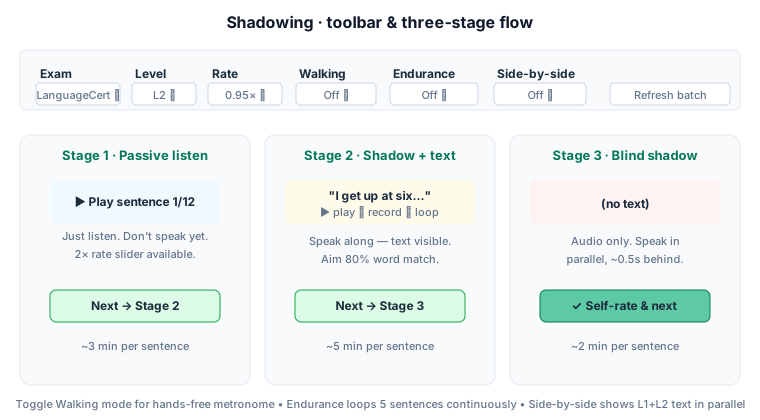
- Exam — restricts the sentence pool to one exam's vocabulary band (LanguageCert / IELTS / TOEFL …). Keep it on your target exam; the sentences will use the lexicon you actually need.
- Level — L1 Foundation (A1–A2), L2 Intermediate (B1–B2), L3 Advanced (C1–C2). Start one level below your current reading ability — shadowing is hard even on easy text.
- Rate — 0.5× to 1.5×. Start at 0.85×, drop to 0.7× for the first pass of any new sentence.
- Walking — Off / On. When On, a pulse indicator times your steps; you can shadow while walking, hands-free. This is the single most useful toggle in the entire tool. Most people quit shadowing because they sit in front of a screen and lose attention. Walking solves that.
- Endurance — Off / 3 / 5 / 7 sentences. When set, the tool auto-loops N sentences in sequence without you tapping Next. Use 5 for daily training; use 3 for warm-up.
- Side-by-side — Off / On. Shows L1 (your native language gloss) next to L2 (English) when text is visible. Helpful in early weeks; turn off by week 3 so your brain stops reaching for L1.
2.2 The three stages, in order
Stage 1 — Passive listen. Sentence plays. You listen. You do not speak. Play it 2–3 times. Goal: catch the rhythm, the stressed words, the connected-speech reductions ("gonna", "I'll", "I'd've"). If you can mentally hum the prosody after listening twice, move on. If you can't, drop the rate by 10% and listen again.
Stage 2 — Shadow with text. Audio plays continuously. You speak along, half a second behind. Text is visible — this is the safety net. Hit ▶ once, speak through the whole sentence, hit ■ stop. Listen to yourself. Most people will discover their pace is behind the audio because they are translating internally. The fix is not to speed up — it is to look less at the text. Glance, then close your eyes; the text is just a checkpoint.
Stage 3 — Blind shadow. Audio only. You speak in parallel. This is where the work happens. Aim for ~0.5 second lag. If you lag a full second, you have stopped shadowing and started imitating-after; restart the sentence.
After Stage 3, the tool offers a 3-button self-rate: ✗ Hard / ◐ Got it / ✓ Easy. Be honest — this writes to your SRS (spaced repetition) so hard sentences come back sooner.
2.3 The mistake almost everyone makes
You shadow for two days, decide it's too hard, then switch back to translation drills. The brain takes 5–8 days to stop reaching for L1 during shadowing. The discomfort in days 1–4 is the method working, not failing. Force yourself through one week before you judge it. Use Walking mode and the workout becomes light enough to sustain.
3. Tool 2 · Mim-Mem — install rhythmic templates
URL: /method/mim-mem/ · Goal: memorise short dialogues verbatim, at native speed, with native intonation, so the patterns are available for free in subsequent drills.
3.1 What the toolbar toggles do
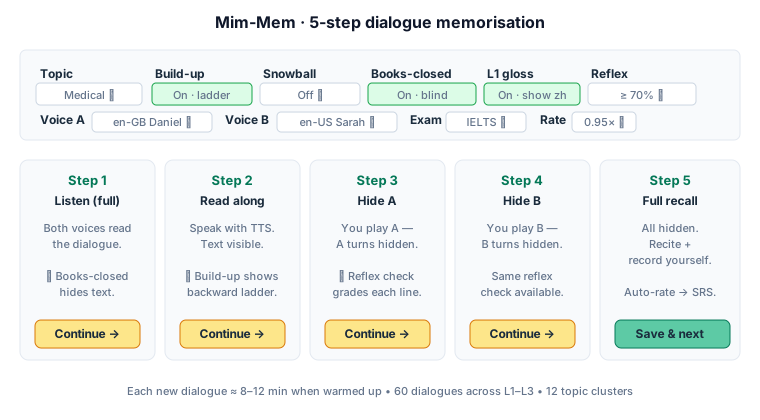
- Topic — filters the 60-dialogue library by cluster (food, transit, medical, work, finance, policy, …). If you have a job interview next week, set Topic = work; you will get 11 work-related dialogues. Use this filter aggressively — variety helps long-term, but for any specific real-life event, focus.
- Build-up — Off / On. When On, long lines are split into a backward ladder (the FSI technique most YouTube tutorials skip). For "I get up at six every morning to catch the early train," the ladder is "…to catch the early train" → "…every morning to catch the early train" → "I get up at six every morning to catch the early train." You hear each rung twice, then the next. Use this toggle on any line ≥ 7 words.
- Snowball — Off / On. When On, Step 2 (Read along) advances turn by turn. After turn 2, you recite turns 1+2 in sequence. After turn 3, you recite 1+2+3. This is Stevick's cumulative recitation. It is demanding — leave it Off for your first week.
- Books-closed — Off / On. When On, Step 1 (Listen) hides all turn text. You hear the dialogue with nothing on screen. This is the FSI textbook's explicit rule: written form interferes with sound. Turn this On from day one. Reading along the first time installs spelling-pronunciation errors that are very hard to remove later.
- L1 gloss — Off / On. Shows the Chinese (or other native-language) translation under each visible turn. Use it for the first 2 dialogues of any new topic; turn it off after.
- Reflex — Off / On (≥ 70%) / Strict (≥ 85%) / Easy (≥ 55%). In Steps 3–5, each hidden turn gets a 🎙 button. Click it, speak the hidden line, the browser ASR transcribes you and compares against the target. ≥ threshold = ✓; < threshold = ✗ Retry. Three failed attempts → Skip button appears.
3.2 The five steps (what actually happens)
Step 1 — Listen (full). Both TTS voices read the entire dialogue. With Books-closed on, you see nothing — just the topic name and "▶ Play". Hit play twice. No text, no notes, no speaking.
Step 2 — Read along. Text appears. You read along with TTS. With Build-up on, long lines render as ladders; click the ▶ Play ladder button to hear each rung twice automatically.
Step 3 — Hide A. A's turns become "(your line — speak it)". TTS plays B's lines; you speak A's. If Reflex is on, after speaking, hit 🎙 to grade yourself against the target. Aim ≥ 70% match.
Step 4 — Hide B. Same as Step 3, roles swapped. Now you speak B.
Step 5 — Full recall. All turns hidden. You recite the entire dialogue from memory. If Reflex collected ratios across Steps 3–5, the tool auto-rates you (1–3 ★) and writes to SRS without asking. If not, a manual 3-button bar appears.
3.3 Common mistakes
- Skipping Step 1. People think "I can read, I'll just go to Step 2." Wrong — Step 1's blind listen is what installs the rhythm. Without it, you read text aloud with reading prosody, not speech prosody.
- Turning off Books-closed. Same mistake one step earlier. If you see "rentre" before you hear it, your brain pronounces it the spelling way forever.
- Doing one dialogue eight times in a row. The point is over-learning across days, not over-saturation in one session. One dialogue per 3-day cycle is the FSI rate. Set it down and come back tomorrow.
4. Tool 3 · Pattern Drilling — make grammar reflexive
URL: /method/drilling/ · Goal: the moment you hear a cue, your mouth produces the transformation — no thinking, no translation, no delay.
This is the most feature-dense tool. 200 drills, 8 kinds, 7 exam packs, and 11 toolbar toggles. You don't need most of them.
4.1 The five toggles that actually matter
Ignore everything else until you understand these five:
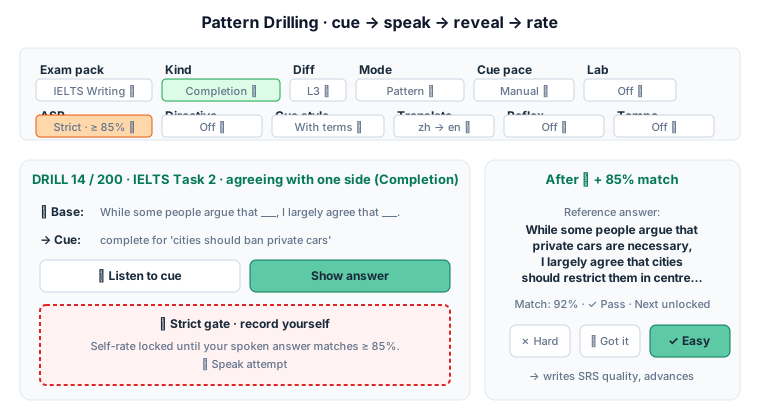
- Exam pack — narrows the 200-drill pool to one exam. Set this to your target exam. IELTS Writing → 112 drills. TOEFL Speaking → 27 drills. Combine with Kind for finer slicing.
- Kind — narrows further by drill kind. The 8 kinds are: Substitution (swap one word), Transformation (rewrite the structure), Expansion (add an element), Response (answer the question), Integration (combine two clauses), Completion (fill the template), Translation (L1 ↔ L2), Lexical (vocabulary slot). For IELTS Task 2 writing templates, pick Kind = Completion. For grammar reflex, pick Transformation.
- Diff — L1 / L2 / L3. Match your current level. Sub-pack the pool further.
- ASR — Off / On (≥ 70%) / Strict (≥ 85% gates Next). This is the toggle that separates serious users from tourists. Off mode = you just self-rate. On = a voice check shows your match score. Strict = the Self-rate bar is locked until you actually speak the answer at ≥ 85% match. Use Strict the moment you're past week 1.
- Lab — Off / 2 s / 3 s / 4 s / 5 s gap. Lab mode is the hands-free four-phase tape: TTS cue → silent gap → confirmation → silent gap → next item. Headphones on, no clicking. Use it for your second 15-minute drilling block each day.
4.2 A drill, end to end
- Drill loads with a base sentence (the source) and a cue (what to do).
Example: Base = "While some people argue that ___, I largely agree that ___." Cue = "complete for 'cities should ban private cars'."
- With Cue pace = Manual, hit 🔊 Listen to cue to hear it; or just read it. Speak the answer aloud right now — before you reveal anything.
- Hit Show answer. Reference appears: "While some people argue that private cars are necessary, I largely agree that cities should restrict them in centre zones." A 🔊 Listen button plays it.
- If ASR is Strict, the 🎙 Speak attempt box is now mandatory. Click it, speak the reference sentence, the browser ASR transcribes you, and a word-level diff shows your match %. ≥ 85% unlocks the Self-rate bar.
- Self-rate: ✗ Hard / ◐ Got it / ✓ Easy. Writes SM-2 spaced-repetition quality. ✗ Hard returns this drill in ~1 day; ✓ Easy in ~6 days.
- Auto-advance to next drill item.
4.3 Two power modes
Progression mode (Mode = Progression). Instead of separate drills, you walk one base sentence through 4 successive kinds: substitution → transformation → expansion → response. Same base, four angles. This is how FSI actually structures grammar lessons; the tool's default Pattern mode is a simplification.
Translation mode (drills with kind = "xlate"). Some drills have a zh ↔ en direction toggle on the toolbar (Translate · zh → en / en → zh). Direction = zh → en makes the cue Chinese and the answer English. en → zh reverses. The Translation cluster is where vocabulary actually gets locked in both directions.
4.4 The mistake that wastes everyone's first week
Picking Mode = Pattern with Kind = All and Exam pack = All, then walking through random drills. You will see 200 drills as a chaotic library and quit on day 4. The fix: pick one exam pack + one kind + one level. You will have 5–20 drills. Do them all in one session. Tomorrow, switch to a different kind. By day 5 you have rotated through all 8 kinds inside one pack. Then you broaden.
5. Tool 4 · Scriptorium — write to remember
URL: /method/scriptorium/ · Goal: consolidate everything via Arguelles' 5-step protocol — read, dictate, compare, look up, re-read.
5.1 The three Arguelles-fidelity toggles
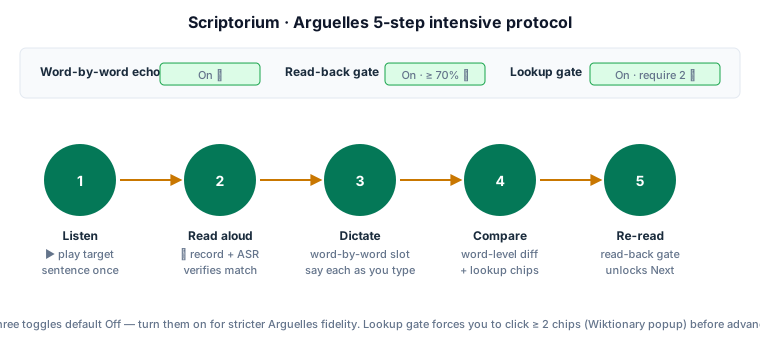
- Word-by-word echo — Off / On. When On, Step 3 (Dictate) becomes a typed-slot interface where you must say each word aloud as you write it. This is what Arguelles' original protocol prescribes; it's slower but more durable.
- Read-back gate — Off / On (≥ 70%). When On, you cannot advance to Step 4 (Compare) until you've read your written version back to ASR and matched ≥ 70%. This catches the common cheat where you mentally check ✓ without saying anything.
- Lookup gate — Off / On (require N). When On, Step 4 (Compare) displays a grid of "chip" buttons for every long word in the sentence. Each chip opens a Wiktionary popup. You must click N chips before Step 5 unlocks. The chips dynamically calculate N = max(1, ceil(words/5)) — typically 2–3 lookups per sentence.
5.2 What you actually do per sentence
- Step 1 Listen — hit ▶ once. Hear the target sentence.
- Step 2 Read aloud — speak it back. ASR verifies; ≥ 70% match unlocks Step 3.
- Step 3 Dictate — type the sentence word by word from memory. With Word-by-word echo on, each slot waits for the spoken word before the next slot accepts focus.
- Step 4 Compare — system shows word-level diff (green = correct, red strikethrough = missed, orange [+] = inserted). The Lookup chip grid appears; click chips for words you didn't know.
- Step 5 Re-read — read the original sentence aloud once more, now knowing every word. ASR verifies again; advance to next.
5.3 When to use Scriptorium vs Mim-Mem
Mim-Mem is for dialogues (8–15 turns of two-voice conversation). Scriptorium is for single sentences (often longer, often from news / academic / literary sources). Same protocol logic, different content shape. Run both — they cover different cognitive layers.
6. Putting it together · a realistic 30-day routine
The hardest part of the four-tool stack is not any individual tool. It is rotation. Here is the schedule that works for adult learners with day jobs:
| Day of week | 30 min morning | 15 min commute | 15 min evening |
|---|---|---|---|
| Mon | Mim-Mem · 1 new dialogue | Shadowing · walking mode | Drilling · 1 pack × 1 kind |
| Tue | Drilling · same pack, new kind | Shadowing · walking mode | Scriptorium · 5 sentences |
| Wed | Mim-Mem · review yesterday's + 1 new | Shadowing · endurance loop 5 | Drilling · Translation drill (xlate) |
| Thu | Drilling · Progression mode | Shadowing · walking mode | Scriptorium · 5 sentences |
| Fri | Mim-Mem · 1 new (different topic cluster) | Shadowing · walking mode | Drilling · Strict ASR, 1 pack |
| Sat | 60 min — Mim-Mem 2 dialogues + recall all 5 from this week | Off | Drilling · Lab mode, 30 min hands-free |
| Sun | OPI prompt: pick a Level Check question, record 1 min answer | Listen back | Light shadowing, no targets |
Five working days × 60 min + Saturday's 90 min + Sunday's 30 min = 6.5 hours/week. At this pace, by week 4 you have memorised ~6 dialogues, drilled ~30 patterns, shadowed ~120 sentences, and dictated ~40 in Scriptorium.
This is roughly 5% of an FSI Category I full-time training week — but it's sustainable for years rather than 24 weeks. The trade-off is realistic.
Want to formalise this into a 30/60/90-day track? Use PrepLearnio's training Camp. It schedules the day-by-day mix automatically, captures an ILR baseline from the self-assessment at enrolment, and triggers a graduation OPI simulation once you complete 80% of camp days.
7. Common mistakes across all four tools
- Sitting in front of the screen for all four. Shadowing should be walking; Drilling Lab mode should be headphones-only. If your eyes hurt after 30 minutes, you're using the tools wrong.
- Picking the highest difficulty too early. Set Diff one level below your reading ability. Drilling and Mim-Mem are about reflex, not understanding; you need the cognitive headroom to focus on rhythm and speed, not vocabulary decoding.
- Skipping the self-rate honest moment. ✗ Hard hurts your ego but books-keeps your SRS. ✓ Easy is for sentences you would produce in your sleep. If you click ✓ Easy on everything, your spaced repetition collapses to "everything in 6 days" and stops working.
- Doing only the favourite tool. People love Shadowing because it feels productive. Then they skip Drilling because it feels mechanical. Result: ear improves, mouth doesn't. Force yourself to spend ≥ 20% of your time on whichever tool you currently dislike most.
- Treating the 30-day routine as a sprint. This is a 5%-effort, 100%-consistency method. Missing a Friday is fine. Skipping a whole week breaks the SRS schedule and costs you 4–6 days of recovery.
8. FAQ
Q: Do I need a microphone? A: Yes for Strict ASR mode, Mim-Mem Reflex, Scriptorium read-back gate, and the OPI simulator. Your laptop's built-in mic is fine. Without one, all four tools still work but in lighter mode — just the self-rate buttons replace ASR judgement.
Q: Which browser works best? A: Chrome or Edge on desktop give the best Speech Recognition; iOS Safari works but requires online. Firefox has no SpeechRecognition support — the tool falls back to subjective rating only.
Q: How long until I see results? A: With 6.5 hours/week starting from CEFR A2: ~30 days to feel ASR matching jump from 50% to 70%; ~90 days to gain one ILR half-step (e.g., 1+ → 2). Diplomats reach ILR 3 in 24–88 weeks of full-time training; an adult with a day job should expect 2–4× that duration.
Q: Should I record everything? A: No. Recording every sentence triples your time. Use the recorder selectively — once per Mim-Mem dialogue (Step 5 only) and once per 5 drills in pattern drilling. Listen back the same evening.
Q: What if I miss a day? A: Skip it cleanly. Don't try to "make up" by doing 2× the next day — the SRS schedule absorbs single skipped days but breaks under crash sessions. Three consecutive missed days is the threshold where you should restart the week's plan from Monday.
Q: Why is there no "speak with AI" mode? A: PrepLearnio runs entirely in your browser with zero paid APIs. LLM voice chat costs money; we made an explicit choice not to add it. For interactive partner work, use the OPI simulator — it doesn't roleplay but it does run the five-stage ACTFL OPI protocol with TTS prompts.
9. The honest closing
The FSI four-tool stack works. So does running, lifting, meditating, and writing daily. The methodology question was solved by 1955; the productivity question was never about methodology. It's about whether you'll open the browser tab tomorrow at the same time.
Start with one tool for the first week — Shadowing in Walking mode is the gentlest entry point. Add Mim-Mem in week 2. Add Drilling in week 3. Add Scriptorium in week 4. By the time you're rotating four tools, the habit is the asset.
Try it for 30 days. Use the training Camp to track it. Read the 90-day ILR 2 plan for the bigger picture. Then judge.
---
References & related reading:
- govtilr.org — ILR Skill Level Descriptions (public domain)
- yojik.eu/fsi-languages/ — FSI Basic Course originals
- Alexander Arguelles, Foreign Service Institute Language Learning lectures (YouTube, "polyglotpoly" channel)
- Earl Stevick, Adapting and Writing Language Lessons (Foreign Service Institute, 1971; reissued public domain)
- Internal: FSI Mim-Mem explained · Pattern drilling six types · Arguelles shadowing original protocol · OPI vs IELTS